In this post I’ll document how I solved the Takeover machine on TryHackMe. It’s not a step-by-step write-up to follow blindly, but rather a review of what I did, what didn’t work, what I learned, and why I made certain decisions.
Setting up dnschef
The first step was to set up a local DNS server with dnschef :
sudo dnschef --fakeip 10.10.202.15 --fakedomains futurevera.thm --nameservers 9.9.9.9
I still need to dig deeper into dnschef, but it seems like a very useful tool. Basically, it acts as a DNS proxy: if a query matches the rules you define, it returns the response you specify; otherwise, it forwards the request to the nameservers you set (by default it uses Google, but here I prefer 9.9.9.9).
It requires root permissions. By default it also resolves *.futurevera.thm, although you can set this explicitly, and it listens on 127.0.0.1 unless you specify a different interface.
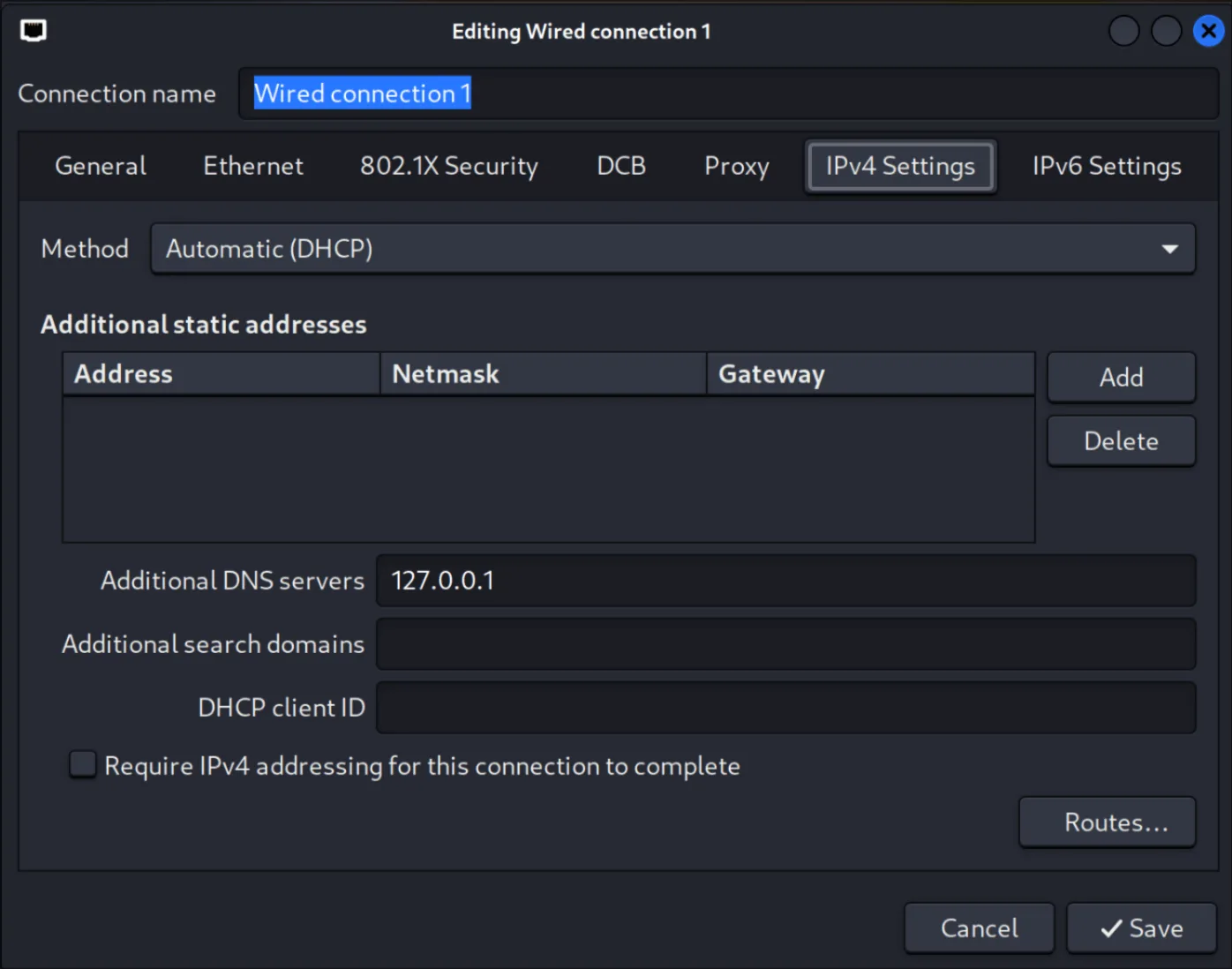
With the service running, I configured NetworkManager to use 127.0.0.1 as the IPv4 DNS. This allows me to resolve all wildcard DNS entries without having to add them one by one to /etc/hosts. Important: /etc/hosts does not support wildcards, so this approach is far more convenient.
Why Gobuster DNS mode doesn’t work here
On this machine, Gobuster’s DNS mode doesn’t work as a filtering tool, because I’ve configured dnschef so that any subdomain resolves to the target IP. This means all subdomains you test with gobuster dns will return “valid” even if they don’t actually exist on the web server.
I’ve seen this misconception in many write-ups: they run gobuster dns in a scenario like this and think the tool is finding real subdomains, when in reality it’s just returning positives because of how their local DNS is configured.
DNS mode vs. VHost mode
- DNS mode: makes DNS queries for each word in the list and checks for resolution. It doesn’t interact with the web service.
- VHost mode: points to the already-resolved web server and changes the Host: header to simulate requesting a different vhost. This allows detecting which vhosts are actually configured and serving different content, even though DNS always points to the same IP.
In an environment like this one, with forced local DNS, VHost mode is the correct approach, because it’s the only one that can distinguish between names actually configured on the server and false positives.
VHost enumeration
I used the following command:
gobuster vhost -u http://futurevera.thm --append-domain -w /usr/share/seclists/Discovery/DNS/subdomains-top1million-110000.txt
The –append-domain parameter is essential: it automatically appends .futurevera.thm to each word in the list, so you can use generic wordlists (admin, portal, support) (like seclists) without needing the full subdomains in the file. This saves time and avoids having to generate specific lists.
In practice, this means that if your wordlist contains admin, Gobuster, when using --append-domain, will test the HTTP header as Host: admin.futurevera.thm in each request. It will do the same with portal (Host: portal.futurevera.thm), support (Host: support.futurevera.thm), and so on with all the terms in the list, simulating real requests to those virtual hosts without you having to write them out in full in the dictionary.
With this enumeration I found, among others:
Found: portal.futurevera.thm Status: 200 [Size: 69]
Found: payroll.futurevera.thm Status: 200 [Size: 70]
When visiting these vhosts, both returned the message:
is only availiable via internal VPN
At this point I decided not to pursue this path further, as it would involve more advanced techniques like IP spoofing or header bypasses, and the machine seemed designed for a more straightforward resolution.
Additional enumeration
I tried searching for second-level subdomains, for example under blog.futurevera.thm and support.futurevera.thm, but only got long lists of entries with Status: 421.
I also performed directory and file enumeration with:
gobuster dir -u http://portal.futurevera.thm -w /usr/share/seclists/Discovery/Web-Content/directory-list-2.3-medium.txt -x html,php,txt -t 50 --no-error
I didn’t find any relevant directories or files in this DIR enumeration.
Interacting with blog and support
Visiting the websites, browsing around, checking the source code, the console, running traffic through Burp Suite to see if there was anything noteworthy…
I didn’t find anything relevant:
- No CMS.
- No forms to test injections.
- Nothing that caught my attention.
The TLS certificate…
At this point I was stuck. After reviewing other write-ups, I found that the key clue was in the TLS certificate of https://support.futurevera.thm . It wasn’t something obvious to me, but it made clear that inspecting the TLS certificate should always be part of reconnaissance. It may include subdomains in the SAN (Subject Alternative Name) field that wouldn’t otherwise appear through enumeration techniques.
In this case, the SAN included:
DNS Name: secrethelpdesk934752.support.futurevera.thm
Thanks to dnschef, I was able to resolve it automatically without modifying /etc/hosts and access the resource:
http://flag{beea0d6edfcee06a59b83fb50ae81b2f}.s3-website-us-west-3.amazonaws.com/
Conclusion
This machine taught me several key things:
- In environments with locally forced DNS, Gobuster’s dns mode doesn’t discriminate results; the correct one is vhost.
--append-domaingreatly simplifies enumeration with generic wordlists.- dnschef is very useful for wildcard DNS and avoids having to manually maintain /etc/hosts.
- The TLS certificate is a source of information that is always worth inspecting, as it can reveal subdomains that won’t appear through more common enumeration techniques.