In March 2024 I wrote Starting my Homelab Project (in Spanish). It was a snapshot of a starting point: a new PC, Arch Linux, the idea of virtualising Proxmox on top of KVM, and a wish list of services that went from Plex to pfSense, with Wazuh and TrueNAS in between.
Two and a half years later, almost none of that survives as it was.
What does survive is what I learned along the way. Today I can deploy almost anything, understand most of the pieces underneath and, above all, tell when something is unnecessary. Like most homelab stories I read, it has been a nice journey to look back on.
And that is the reason for this post. With Claude Code and AI in general, it is trivially easy today to say “set up this service for me” and have it running in ten minutes. But without the basics of networking, Docker and Linux, it is just as easy to end up lost among configurations you don’t understand and that, sooner or later, break.
So here is what I have, why it is the way it is, and what all of this has given me.
Do I need Proxmox for a homelab?
No. If you are a single user, with two or three devices, and you want services like Nextcloud, Immich or Jellyfin for yourself, Docker Compose on a regular Linux distribution is enough.
Proxmox makes sense when you need several isolated virtual machines, you have several physical machines, or you want to practise virtualisation because it matters to you professionally. For a personal home setup, it adds a layer of complexity and eats baseline resources in exchange for a flexibility you will probably never use.
I say this from experience, because I went down that road.
My Proxmox phase: overcomplicating everything
Back then I didn’t want to turn the host into Proxmox, so I installed it inside a KVM virtual machine. That decision alone made my life harder from day one.
To pass the GPU through to Immich and use its AI-powered search, I had to fight with passthrough. To get decent storage, I bought an external drive and set up a pool. And to have everything see each other, a dedicated network bridge.
Inside Proxmox I had several virtual machines, a virtual router running OPNsense (I did get it installed and working, but it added too much complexity for what I had) and a handful of services I didn’t really need. Later I removed Proxmox and kept plain virt-manager: loose virtual machines, each one connected through Tailscale.
It was real learning and I don’t regret it. At the time, on top of that, configurations were not as easy to sort out as they are now with an AI by your side: it was hours of documentation, forums and Reddit.
But there was no single last straw. What happened is that, in parallel, I was using Docker and finding it absurdly simple. And after so many hours debugging and fixing things, you forget that the homelab is there to be used.
At the beginning it is fun to maintain it, update it, let it get complicated. Then you simply want things to work.
Is Docker Compose enough for a homelab?
Yes, for the vast majority of home use cases.
One docker-compose.yml file per service gives you deploy and shutdown in a single command, isolated internal networks between containers, volumes for your data, and a huge community that has already written the compose file for almost anything you might want to run. What it doesn’t give you is OS-level isolation or full virtualisation. For personal use, you rarely need that.
| Criterion | Proxmox / virtual machines | Docker Compose |
|---|---|---|
| Baseline usage | A hypervisor plus a full kernel per VM | Only each container’s processes |
| Initial complexity | High: networking, storage, passthrough, backups | Low: one YAML file per service |
| Learning curve | Virtualisation, virtual networks, ZFS/LVM | Images, volumes, Docker networks |
| Maintenance | Update the hypervisor and every guest OS | docker compose pull and up -d |
| Isolation | Full (own kernel per VM) | Process level (shared kernel) |
| When it makes sense | Several machines, isolated VMs, practising virtualisation | One user, few devices, personal services |
I also had a peek at Kubernetes and Docker Swarm. I dropped them quickly: they weren’t for me and, besides, I don’t have more machines to orchestrate. A single host doesn’t justify an orchestrator.
Would I recommend going through Proxmox even if you end up leaving it? I’d say no. Docker is genuinely simple, it gives you that ease of turning services on and off, and with Tailscale you reach everything from your own VPN without exposing anything. If at some point you need a virtual machine, you spin one up with virt-manager alongside. That is exactly what I do with Pi-hole.
My homelab today
It is still the same PC from the 2024 post, which is also my daily work desktop running Arch Linux and Hyprland :
- CPU: Intel i5-13500 (14 cores)
- RAM: 32 GB DDR5
- GPU: AMD Radeon RX 6600, which Immich and Ollama use through ROCm
- Storage: Kingston KC3000 2 TB NVMe (a single drive, no RAID)
- OS: Arch Linux with Hyprland
For a long time I kept KDE as a fallback in case things got complicated, and I also tried COSMIC in its early releases. I really liked it.
On storage: I have thought about setting up a couple of hard drives in RAID, but I don’t have much physical space and, honestly, no real need either. My media library is very much under control: I get what I want to watch, I watch it, and I delete it.
I haven’t measured power consumption; it is on my to-do list. My impression is that the cost depends more on how you use the services than on having them up. With the containers idle, the machine barely works.
One directory per service
The structure is as simple as it sounds:
~/homelab/
├── traefik/
│   ├── docker-compose.yml
│   ├── traefik.yml
│   └── letsencrypt/
├── nextcloud/
├── immich/
├── jellyfin/
├── ollama/
├── openwebui/
├── searxng/
├── dawarich/
├── actualbudget/
├── beszel/
├── archived/
└── update-homelab.sh
Each directory has its docker-compose.yml with whatever it needs: the app, its database, its Redis. I don’t keep it in Git. Services I have tried and stopped using go to archived/, with their compose file intact in case I ever come back to them.
Updates: latest and pray (but with a method)
Almost everything runs on latest. I know it isn’t orthodox, but for a personal homelab it pays off.
The exceptions are Nextcloud and Immich. There I do read the release notes before updating, because they are the ones holding my data and the ones that have had the most breaking changes.
To avoid going directory by directory, I have a script, update-homelab.sh, that walks every folder with a docker-compose.yml, runs pull, detects whether there are new images and only then restarts the service. It skips archived/ and Nextcloud (which updates from its own master container), and leaves Traefik for last so it doesn’t cut access to everything else halfway through.
The services I actually use
This is the honest list. What I do with each one, not what I would like to do.
Traefik , the reverse proxy. I tried Caddy first and then Nginx Proxy Manager, but with Traefik it is really simple: I add a few labels to each service’s compose file, TLS is handled on its own, done. I only expose each container’s ports to Traefik’s internal Docker network, never to the host. It also runs the Coraza plugin as a WAF, more for learning than out of need, because nothing is exposed to the internet.
Nextcloud (AIO install), my replacement for Google Drive and OneDrive. I use it daily to sync files between Mac, Linux and iOS, including my Obsidian vault.
Immich , alongside iCloud as a photo backup. I haven’t left iCloud because I have a shared gallery with my partner of around 37,000 photos, and that feature is hard to replicate in Immich. I use it to deduplicate the library and search by people. I like its philosophy and I will surely make the full jump eventually.
Jellyfin . I started with Plex and switched quickly. The odd film or series I can’t find on streaming platforms, connected to the TV locally, and not much else. I don’t run the arr suite: I’m a casual media user.
Ollama + Open WebUI , to dabble with local models and hook Ollama up to other containers. With 8 GB of VRAM, running a decent model is tricky, and since I don’t code much either, I don’t use it for autocompletion or anything like that.
SearXNG , the metasearch engine. I have it, I tinker with it now and then, but truth is I don’t use it. AI in the SERPs and Perplexity are very convenient.
Dawarich , the Google Timeline alternative. I like being able to look back and see where I was on a given day, and that the data belongs to nobody else. I use it to correlate transactions and places. It doesn’t need to be connected to the tailnet: it keeps capturing points and syncs later.
Actual Budget , homemade bookkeeping for monthly expenses.
Beszel , lightweight performance monitoring, both for this machine and the VPS.
And marketing and SEO tools: Bisibility , where I collaborate as a tester and contribute ideas, and Elmo, still to be explored.
In archived/ live Baserow, Brewlog, Gitea, Homepage, LibreChat, Linkding, Pi-hole (the Docker version from the macvlan post
), Stirling PDF, Vane and Whoogle. I tried them, used some for a while, and keep them just in case.
The endless rabbit hole
Every now and then I fall into the trap of browsing some “top apps for your homelab” list, an awesome docker compose or someone else’s setup, and I almost end up wanting to deploy everything. Then it never gets used.
That is the endless homelab rabbit hole. The best defence I have found is the list above: if I can’t say in one sentence what I use it for, it goes to archived/.
How much do 40 containers use?
A lot of people want to keep RAM to a minimum. I think RAM is there to be used.
Right now I have about 40 containers up, counting databases, Redis and other auxiliary pieces. Between them they use about 8 GB of RAM out of the 32 available. The hungriest are Nextcloud AIO’s full-text search and antivirus (almost 3 GB between the two) and the Immich server with its database (1.5 GB). The rest are dozens of containers between 10 and 300 MB.
The CPU, at idle, barely moves. Most containers sit below 1%, and only Immich and ClamAV go above 3% when they are processing something.
So far I haven’t had to worry about this because the machine has plenty of headroom. If you had 8 or 16 GB, dropping Nextcloud’s full-text search and ClamAV, everything would still fit.
And a small “cloudlab” too
Apart from the homelab I have a simple VPS at Hetzner with a few things that do need to be public: Umami for this site’s analytics, Uptime Kuma and a few static Hugo sites.
It has given me a lot of experience too, because there you do have to think about exposure, firewall and hardening. And, naturally, it sits inside the same tailnet as the homelab.
Tailscale: reaching the homelab from outside without opening ports
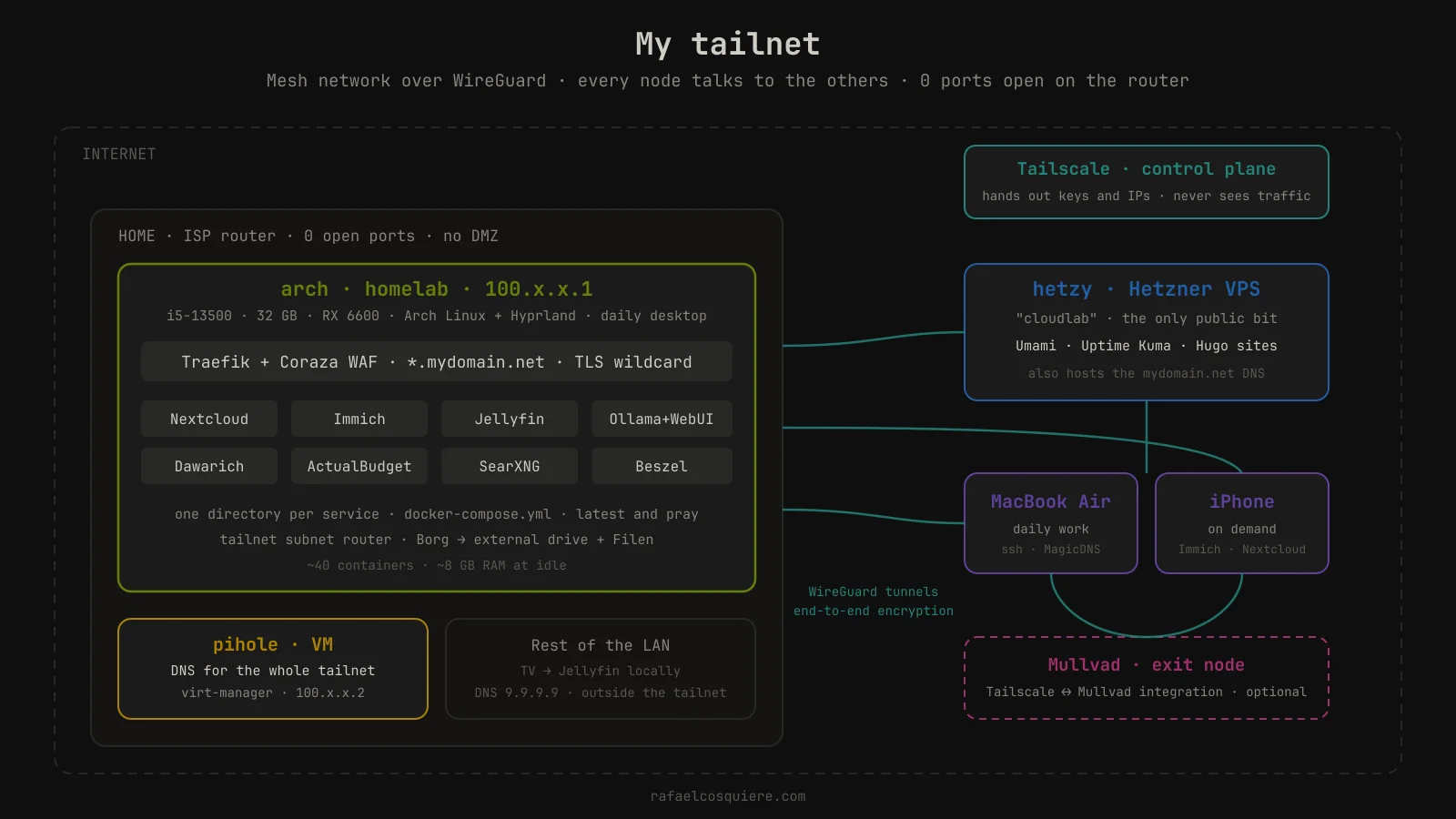
Here comes the special mention. I think Tailscale is amazing, and it is the piece that makes everything above make sense with zero ports open on the router and no machine in a DMZ.
How do I reach my homelab from outside without opening ports?
With a mesh VPN like Tailscale. You install the client on every device, sign in with your account, and they all become part of a private network (the tailnet) over WireGuard, without touching the router.
Each device gets a fixed IP in the 100.x.y.z range and can talk to the others wherever they are. Nothing on your local network is exposed to the internet: from outside, your public IP has no port listening.
My tailnet is small: the homelab PC, the Hetzner VPS, the Pi-hole virtual machine, the MacBook Air and the iPhone.
Why Tailscale and not plain WireGuard
I already covered how to set up a VPN with WireGuard , and it went well: fast, easy to implement. The problem was maintaining several devices.
Connecting to Hetzner from Linux with one set of keys and from the Mac with another was a bit chaotic. On top of that, back then I was using NordVPN (and later Mullvad), and it was always being on one VPN or the other, with all the complications that brings.
Tailscale solved both things at once. All devices see each other without managing peers or keys by hand, and with its Mullvad integration I can use a Mullvad server as an exit node when I want my traffic to leave from somewhere else.
I haven’t tried Nebula, Headscale or other alternatives. Tailscale’s free tier gives me far more than I need.
What I use from Tailscale (and what I don’t)
- MagicDNS: every machine answers by name (
ssh hetzy), no need to remember IPs. - Subnet router: to reach my home LAN from outside when needed.
- Exit nodes: Mullvad’s, or leaving through a specific machine.
- Taildrop: very occasionally, to pass a file between the Mac and the PC.
- Tailscale Serve: used it once and it worked fine.
- ACLs, Funnel, Tailscale SSH: I don’t use them.
My case is simple: SSH between my machines and serving homelab content to the rest of my devices.
The trick: your own subdomains with real TLS inside the tailnet
This is the part of the setup I like the most. I wanted to reach my services as immich.mydomain.net or nextcloud.mydomain.net, with real HTTPS and no browser warnings, but without exposing anything to the internet.
The solution has three pieces:
- Public DNS pointing to a private IP. In my domain’s DNS records, the wildcard
*.mydomain.netpoints to my PC’s Tailscale IP (100.x.y.z). It is a public record, anyone can look it up, but that IP is only reachable from inside my tailnet. Outside of it, it leads nowhere. - Wildcard certificate through a DNS challenge. Traefik asks Let’s Encrypt for a certificate for
*.mydomain.netusing the DNS-01 challenge. Instead of exposing port 80 for Let’s Encrypt to verify, Traefik creates a temporary TXT record through my DNS provider’s API (Hetzner, in my case). Valid certificate, automatic renewal, zero ports. - Traefik routes by hostname. Each service carries a label in its compose file like
traefik.http.routers.immich.rule=Host(`immich.mydomain.net`), and Traefik serves it with the wildcard certificate.
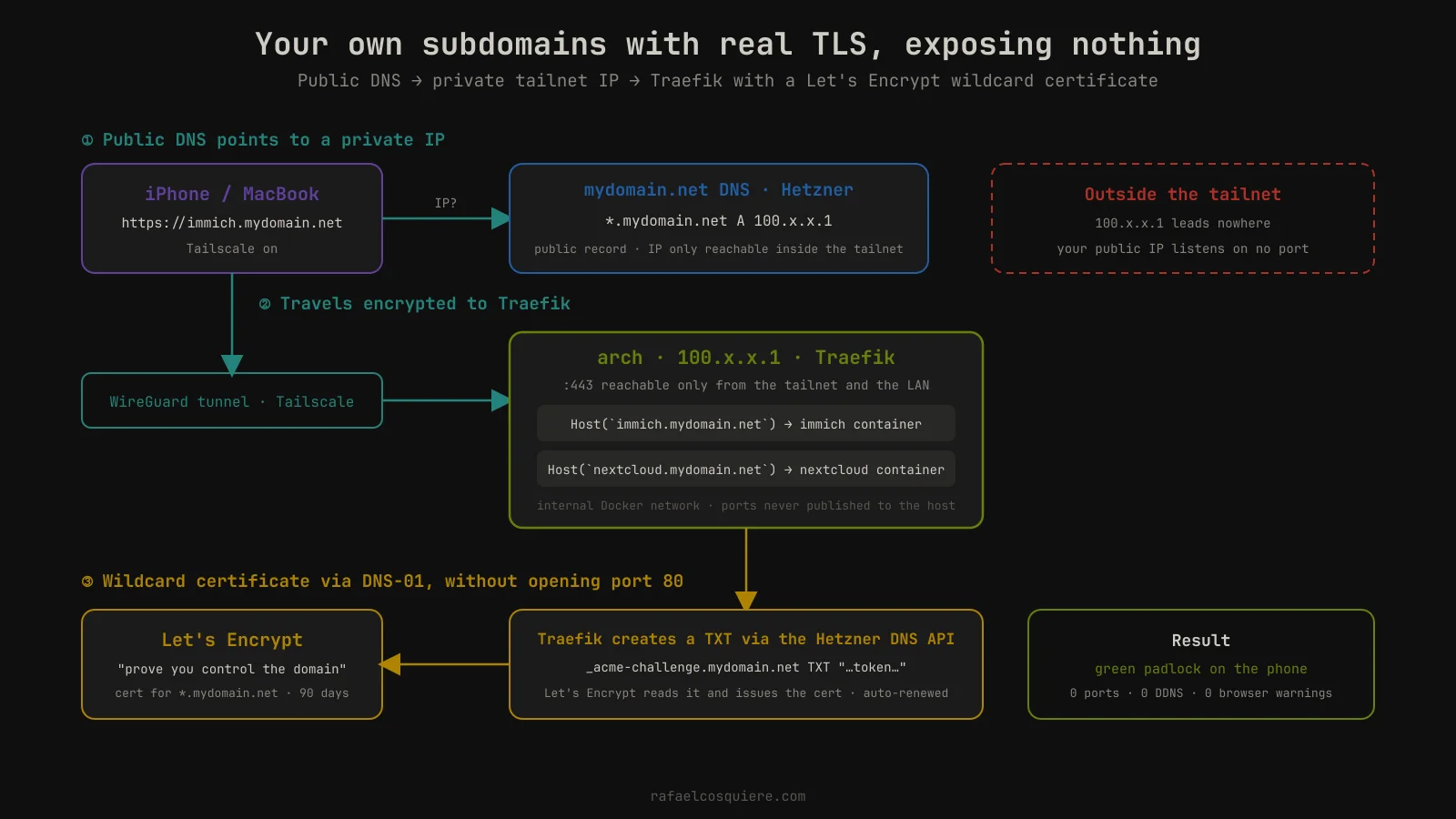
The result: from my phone I turn on Tailscale, open immich.mydomain.net and get in with a green padlock, as if it were a public service. And from outside the tailnet, that name doesn’t resolve to anything useful.
If you are interested in a step-by-step tutorial on how I have this implemented (Traefik, DNS challenge and Tailscale), email me . If there is interest, I’ll write it.
Pi-hole for the tailnet only
After a reinstall I stopped using the Docker Pi-hole with macvlan from the previous post . Now I have a small virtual machine with Pi-hole acting as DNS for the whole tailnet: any device connected to Tailscale resolves through it, whether at home or away.
My local network, on the other hand, uses Quad9 (9.9.9.9) directly. It is a compromise: when I’m on a network I don’t control, I turn on Tailscale and my DNS resolution goes through my own Pi-hole. I still need to revisit this and put it back in Docker, or have several Pi-holes spread around.
From the phone
I use it little, but on demand it works great. I turn on Tailscale to get into Nextcloud or Immich, to route my DNS through Pi-hole when I’m on an untrusted network, or to exit through a specific node. Nothing more.
What is not so pretty about Tailscale
A bit of criticism, so the recommendation has some credibility:
- Once, a machine’s session expired and I couldn’t get into it remotely. I had to go to the console and re-authenticate it by hand. If you are going to depend on it, check the key expiry of your nodes.
- It isn’t pure self-hosting. The control plane (who is on your network, the identity keys) is managed by Tailscale. Traffic is end-to-end encrypted between your devices and they don’t see it, but you depend on a third party to coordinate the network.
For me the convenience is worth it. If you have a specific need, you can always set up WireGuard by hand.
Is Tailscale worth it?
For a personal homelab, yes, without a doubt. The free plan more than covers a single user with several devices, setup is five minutes per device, and in exchange you forget about opening ports, dynamic DNS and managing WireGuard keys by hand.
The main trade-off is depending on their control plane. If that bothers you, Headscale exists as a self-hosted alternative.
I could even open a node to the public or give my partner or a relative an account to use my services. For now, I’m the only one using them.
Backups (or how Claude Code helped me with the boring part)
This is where having an AI by my side has helped the most, because it is exactly the part everyone leaves for later.
I have Borg as the backup repository for the important data. I copy that repository to a physical external drive I plug in every so often, and also to Filen , an encrypted cloud storage. Local copy, external copy and off-site copy.
Homelab in the AI era
Today, a deploy is as simple as telling Claude Code:
I want to deploy this GitHub repository in my homelab. Use my existing Traefik setup, create the directory and bring it up.
And in ten minutes I have something running to test. If I like it, I keep polishing it on my own. In 2024 that same task cost me a whole afternoon reading documentation, a half-finished README and three Reddit threads.
Has the AI ever set up something “working” but wrong, in terms of security or permissions? It hasn’t happened to me… or it has and I haven’t noticed. I try to stay on the safe side when deploying, although I admit I’m quite a bit less paranoid than before: I’m on my machines every day, I notice when something is off, and nothing is exposed to the internet.
My advice if you are starting today
Whoever starts today is in a curious position. Back then it was reading lots of documentation, lots of nerdy posts like this one, checking Reddit and forums. Today AI solves it for you, but it doesn’t teach you. Explicitly asking it to teach you is tedious, and the normal thing is that you accept the solution and move on.
I believe the basics are still necessary. I remember spending a whole week on a free terminal tutorial (The Odin Project
was my starting point) to learn my way around bash: cd, ls, mv, mkdir, grep. Nothing spectacular, but it is what lets me understand today what the AI proposes and correct it.
The underlying problem is still the same as before: patience. Having the patience to read and try doesn’t change. Before it was tutorial hell and now it is AI, which can be incredible but can also feed the anxiety and the rush to build things you don’t understand.
Who I learned from
If you want to start where I started, these are the channels I learned from. I haven’t followed them for a while, and there are many more creators dedicated to homelabs now, but they are still a good foundation:
A special mention for Alex, from KTZ Systems . He has been the voice of Tailscale over these years and is a great communicator. As I write this note he is saying goodbye to the company, and I think many of us have grown fond of him along the way.
And be careful with NetworkChuck . He makes very digestible content and mixes teaching with entertainment, but he sends your hype through the roof. Watch it knowing what it is.
Frequently asked questions
Is Tailscale safe? Aren’t you afraid of depending on a company to access your own network?
Nothing is one hundred percent safe. I trust Tailscale because they give me a good feeling as a company, because of their privacy and security policy, and because they have been transparent all these years and have kept improving. Traffic between my devices is end-to-end encrypted with WireGuard; what they manage is the network coordination, not my data.
What happens if Tailscale goes down or shuts down? Do you have a plan B?
Good question, and I hadn’t considered it until now. I will probably have to set up WireGuard as a fallback for that case, or find some alternative mechanism. Noted as a pending task.
Docker on Arch Linux on your daily desktop? Isn’t it risky to mix homelab and work machine?
Yes and no. I work on both the Mac and the desktop, so I don’t depend on a single machine. And the homelab is services only I use and that are not exposed to the internet, so the attack surface is minimal.
Why not Headscale, if you like self-hosting?
Because I didn’t know about it until now, and because for the most sensitive things I sometimes prefer to trust professionals. That is also why I don’t self-host my own password manager.
How do you share services with your partner or family if everything is behind the tailnet?
I don’t share them. Only I use them. With Tailscale it would be easy to invite someone to the network, but for now there is no need.
Would you go back to Proxmox if you had a second machine?
No. I didn’t see a practical point to it in a home environment, unless you want to practise virtualisation for some specific reason. With Docker Compose and the occasional virtual machine in virt-manager I have everything I need.
Are you going to publish your docker-compose.yml files?
It is pending. If this post gets interest, I’ll upload the sanitised compose files to a GitHub repository. In the meantime, email me if you want a specific one.
Conclusion
If I had to sum up these two and a half years in one sentence: less is more. One directory per service, one reverse proxy, one mesh VPN and zero open ports.
None of this impresses in a screenshot, but it works every day without me touching it, and when I want to try something new I have it up in ten minutes.
And most importantly: I understand every piece. That is what the homelab has really given me, and it is what no AI will give you if you don’t put in the patience to learn it.
All my posts on the topic are under the homelab tag . If you have questions or want to tell me how yours is set up, send me an email.